Escaping Git Hell: When Your Commit History Stops Looking Like a Bowl of Spaghetti

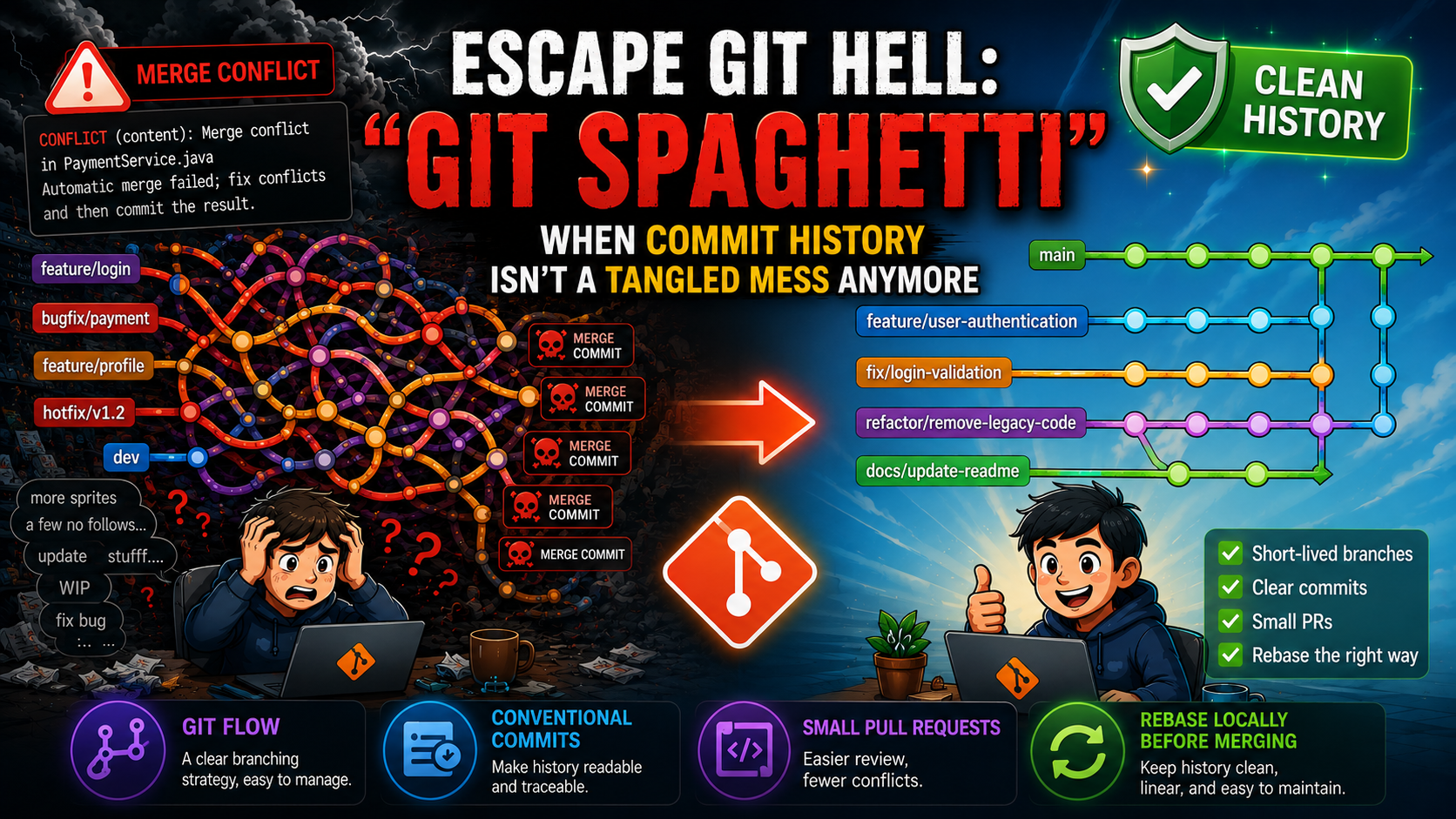
This article delivers a deep dive into "Git Hell"—a common pitfall as software projects scale up. By identifying the symptoms of a tangled Git history, such as "Spaghetti Git", deep merge conflicts, and the abuse of cherry-picking, the author proposes architectural, standardized solutions: adopting Git Flow, implementing Conventional Commits, controlling Pull Request sizes, and leveraging Local Rebase to build a clean, linear, and sustainable Git history for engineering teams.
1. Introduction
In modern software development, Git is not merely a Source Code Management (SCM) tool, but also the core foundation for maintaining collaboration and project integrity. In the early stages, when working individually or within a small team, operations such as commit, push, and pull usually proceed very smoothly.
However, as a project expands, the number of engineers increases, and delivery pressure grows, the branching system can easily fall into a state of losing control. One beautiful morning, the familiar yet haunting message appears after running git pull origin dev:
CONFLICT (content): Merge conflict in PaymentService.java
Automatic merge failed; fix conflicts and then commit the result.
At this point, developers are forced to temporarily stop their actual work and become "archaeologists", digging through dozens of vague commits to find answers to questions such as: Who modified this file? When was it modified? And why has the source code structure become so severely conflicted?
This is the manifestation of "Git Hell" – a consequence of abusing Git and lacking standardized practices within a development team.
2. The Nature of "Spaghetti Git" and Its Recognizable Symptoms
Git is a powerful and precise distributed version control system. Git itself does not create problems; the problem lies in how people think and operate the process. The symptom of "Spaghetti Git" appears when branches are created freely, without control, and without following any specific branching strategy.
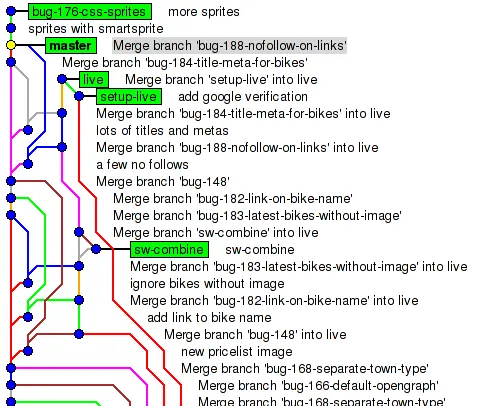
When looking at a Git repository that has fallen into a "disaster" state, we can easily identify the following core symptoms:
- Non-linear History: Branches intertwine and zigzag uncontrollably. The main branch (master/live) loses its role as the "backbone" because child branches continuously diverge from and merge back into it without any clear pattern.
- Explosion of Noisy Merge Commits: A large number of automatically generated commits such as
Merge branch '...' into liveappear. Overusinggit mergefor daily code synchronization makes Git history bloated and makes it difficult to find commits that contain actual code changes. - Cross-merging: One feature branch is merged into another feature branch (for example,
bug-183is merged intosw-combine), and only afterward are they merged into the main branch. This creates dangerous cross-dependencies, making it extremely difficult to isolate or revert a faulty feature. - Meaningless Commit Messages: The commit history is filled with messages such as
more spritesora few no follows. These messages provide no explanation of why the code was changed, turning investigations usinggit logorgit blameinto a painful experience.
3. Classic Problems Caused by an Overly Complicated Git History
When the Git structure becomes broken, it does not merely create visual clutter; it also leads to serious consequences for team productivity and product stability.
When two or more engineers modify the same logical area of a file without communication or clear separation of responsibilities, Git shifts the responsibility of conflict resolution to humans.
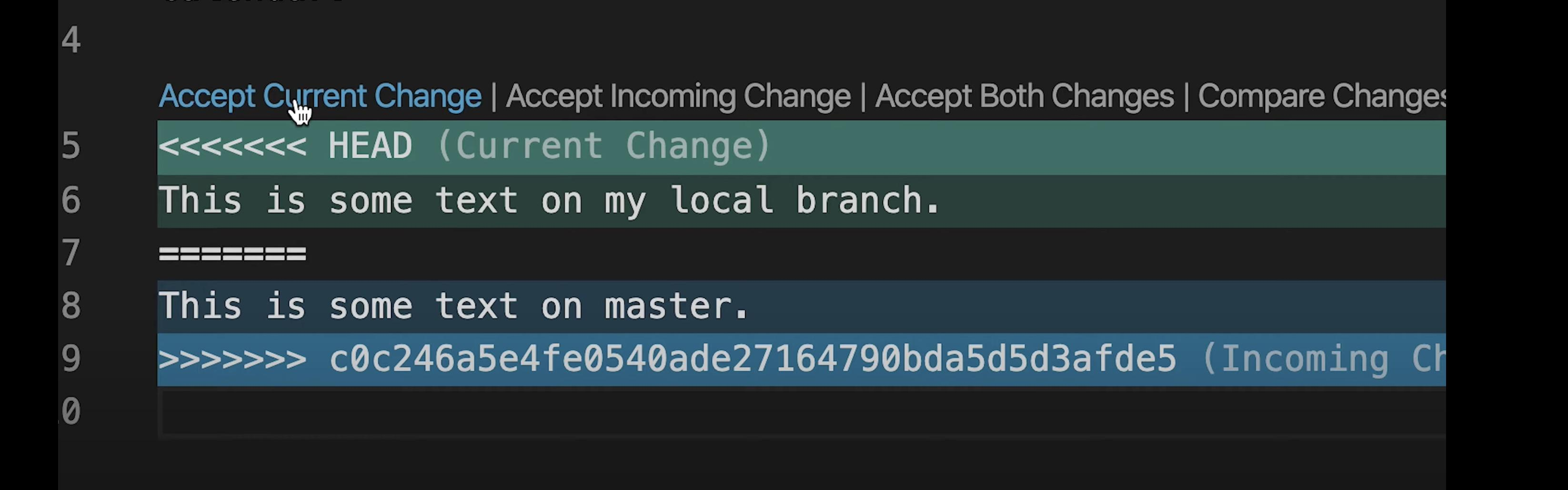
Deciding which code to keep and which code to discard requires a deep understanding of both implementations. Resolving conflicts incorrectly is one of the leading causes of bugs reaching the Production environment.
When an urgent hotfix is required, many teams choose a temporary solution by fixing the issue on one branch and then cherry-picking that commit into the release branch.
In the short term, the issue is resolved. However, in the long term, this practice creates duplicate commits, breaks traceability, and can result in old bugs unexpectedly reappearing (regression bugs) when large branches are merged together weeks later.
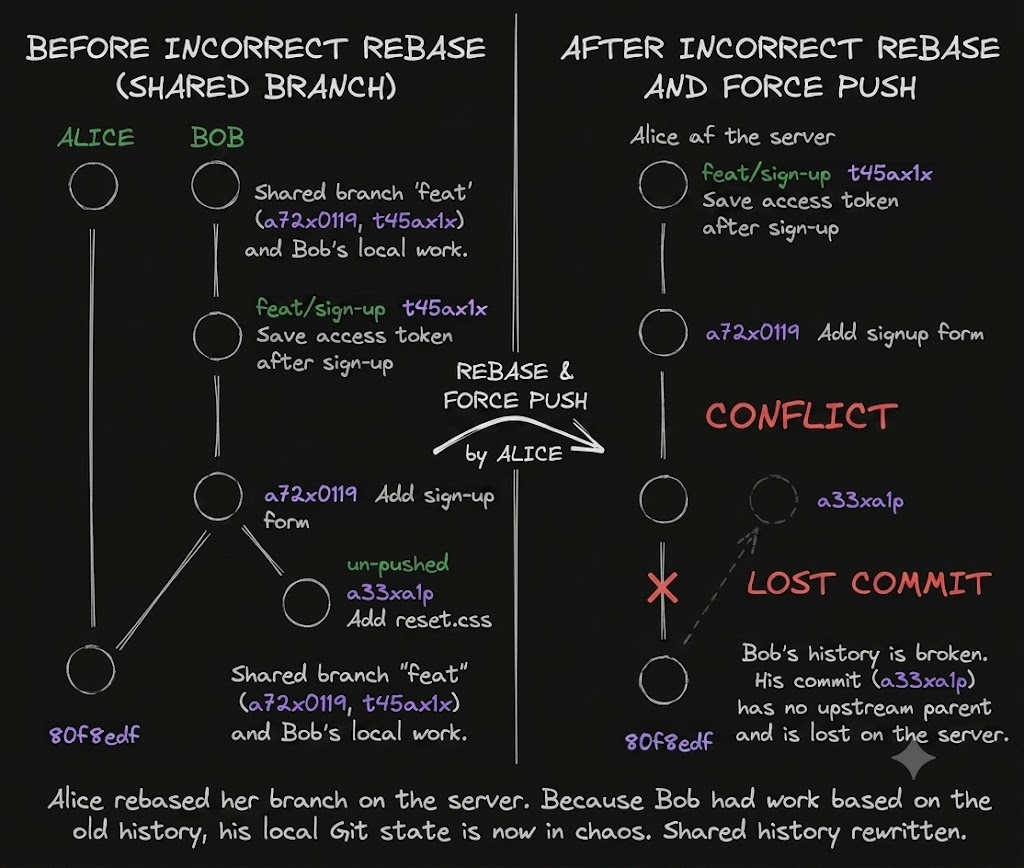
git rebase is an excellent tool for cleaning up commit history before integration. However, if a rebase is performed on a shared branch that multiple people are actively using, and is followed by a force push (git push -f), the entire branch history will be rewritten.
This action can completely disrupt the local Git state of other team members, causing chaos and unnecessary loss of work.
A feature branch that remains active for too long (from several weeks to several months) without being merged into the main branch is like a ticking time bomb.
Over time, the logical gap between that branch and the main branch grows larger and larger. On the day it is finally merged, the number of structural conflicts will be proportional to the amount of time that branch has existed.
4. Architectural Solutions for Building a Clean and Standardized Git History
Projects should use a Git Flow-based branching model to clearly separate different types of work and reduce risks during development. Some suggested branch types include:
- main: Source code currently running in the production environment.
- feature/*: Development of new features.
- fix/*: Regular bug fixes.
- hotfix/*: Emergency fixes for production issues.
- refactor/*: Code improvements or restructuring.
- docs/*: Documentation updates.
- chore/*: Maintenance tasks or system configuration updates.
- test/*: Adding or modifying test code.
- release/*: Preparing a new software release.
Examples:
feature/user-authentication
fix/login-validation
hotfix/payment-timeout
refactor/remove-legacy-code
docs/update-readme
The description part should be concise, clearly express the purpose of the change, and use hyphens (-) to separate words.
When branch names become too long, prioritize placing the most important information first so they can be easily recognized in Pull Requests and source code management tools.
The core principle is to keep branch lifecycles as short as possible. The longer a branch exists, the higher the likelihood of merge conflicts, increasing both integration and testing costs.
Apply the Conventional Commits specification to turn commit history into highly readable technical documentation.
Standard syntax:
- feat(auth): add Google OAuth2 authentication (Adding a new feature)
- fix(payment): resolve duplicate transaction validation (Fixing a bug)
- docs(api): update endpoint documentation for user profile (Updating documentation)
Break down large tasks into smaller, independent technical tasks. Instead of submitting a single Pull Request that contains UI changes, business logic, and database changes all together, split it into smaller Pull Requests:
- One PR for database structure changes.
- One PR for service/API implementation.
- One PR for the user interface.
The ideal Pull Request size should be under 300 lines of code.
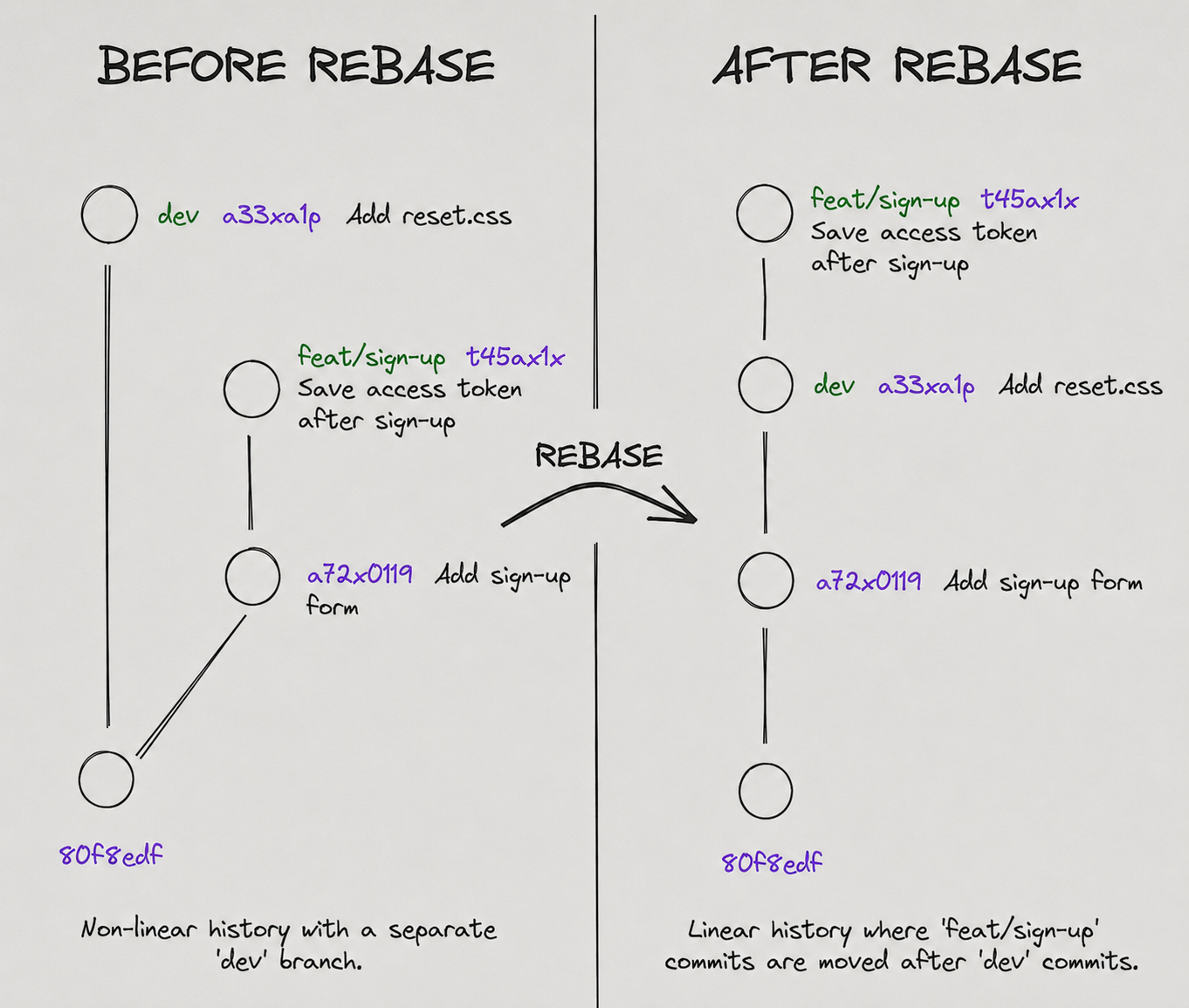
To keep the history of the main branch as a clean linear history, team members should perform a rebase locally before creating a Pull Request.
# Update the latest version of the main branch
git checkout dev
git pull origin dev

# Switch back to the feature branch and perform rebase
git checkout feature/user-authentication
git rebase -r dev
The following illustration demonstrates the benefits of using git rebase:
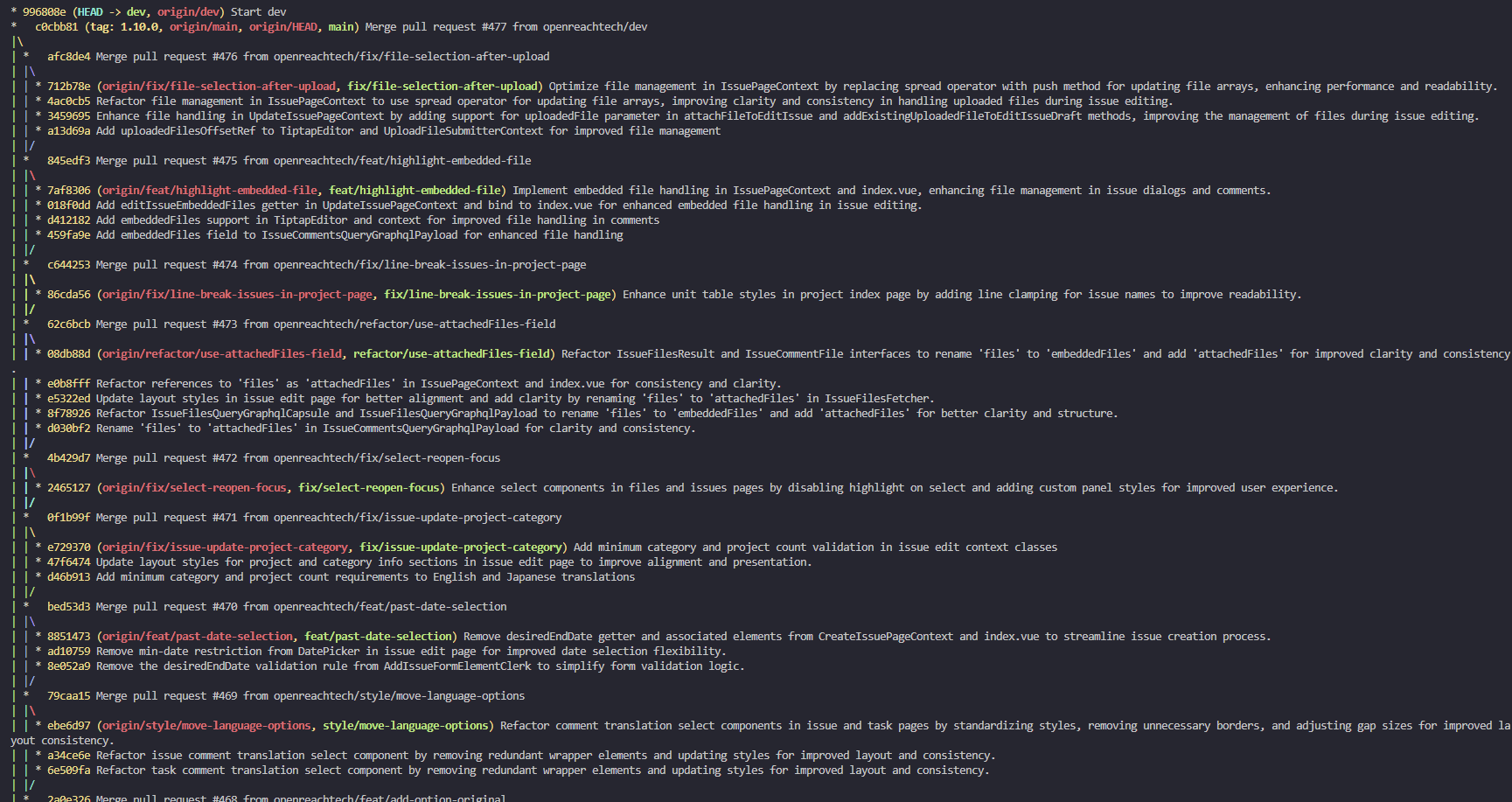
When every team member consistently follows this local Git rebase workflow before creating a Pull Request, the Git "spaghetti" or "spider web" history disappears entirely. Instead, the project's Git history becomes clean, linear, and easy to understand, like this:
5. Conclusion
Ultimately, Git is merely a tool that reflects the management mindset and working culture of an engineering team. Poorly designed code can be refactored, but a Git history that has become chaotic and lost its traceability is almost impossible to recover.
To prevent a "bowl of spaghetti" from appearing in your project, every team member must maintain discipline: keep branches short-lived, write clear commit messages, create small Pull Requests, and use rebase correctly.
These practices form the foundation of professional and sustainable software engineering.