The 18 checkpoints and 4 gates one feature passes through

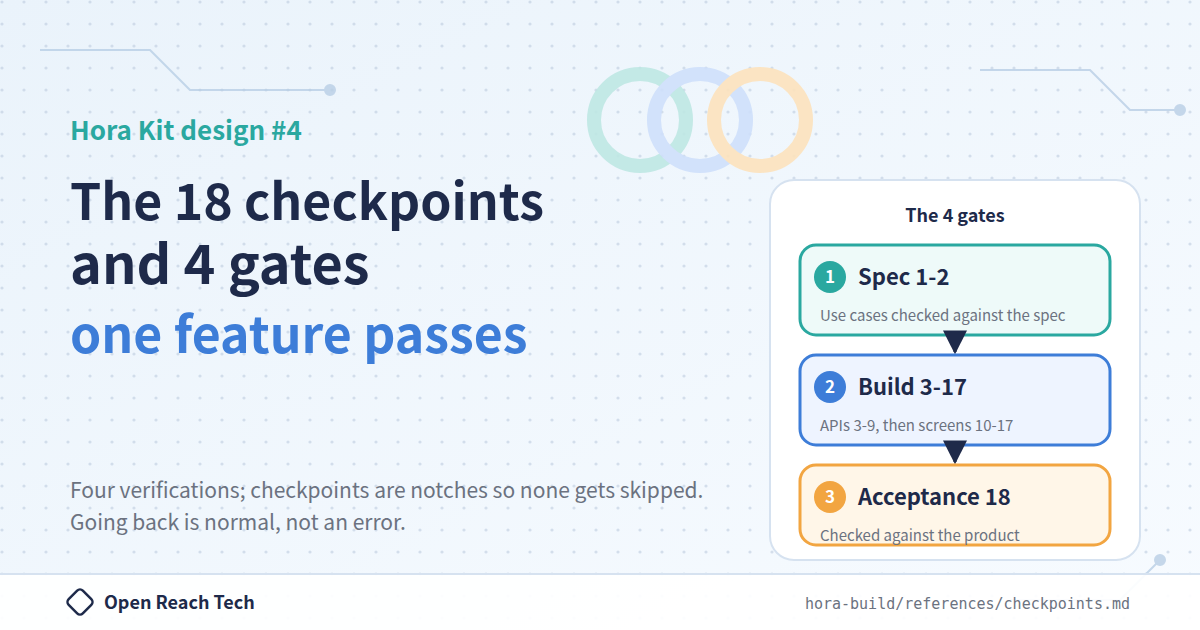
The fourth article in the "Hora Kit design" series. We lay out all 18 checkpoints a feature passes through before it reaches production, and write about why they are in this order and how far back you go when a verification fails. By the end, the 18 should look like "4 verifications and the work between them".
1. Introduction
This article is the fourth in a series explaining the design of Hora Kit, the AI development framework that we (Open Reach Tech) released as open source. The main article is here.
We open-sourced Hora Kit, an AI development framework for truly automated development
A note on terminology. The only command you type in Hora Kit is
/hora. Depending on the situation,/horacalls/hora-spec(writes the spec),/hora-setup(creates the implementation repositories),/hora-plan(fixes the version and writes the feature list and contracts),/hora-build(takes one feature through the 18 checkpoints), and/hora-accept(performs acceptance) in order. Only/hora-hotfixis not called by/hora; a person runs it directly. The docs call/hora-spec"the deciding side" and the rest "the building side", and this article uses those names as well.
In the main article we wrote that "one feature passes through 18 checkpoints". Looking at the number 18 alone, it probably feels like too many.
In this article we lay out all 18, and write about why they are in this order and where the run goes back. By the end, the 18 should look like "4 verifications and the work between them".
2. 18 checkpoints, 4 gates
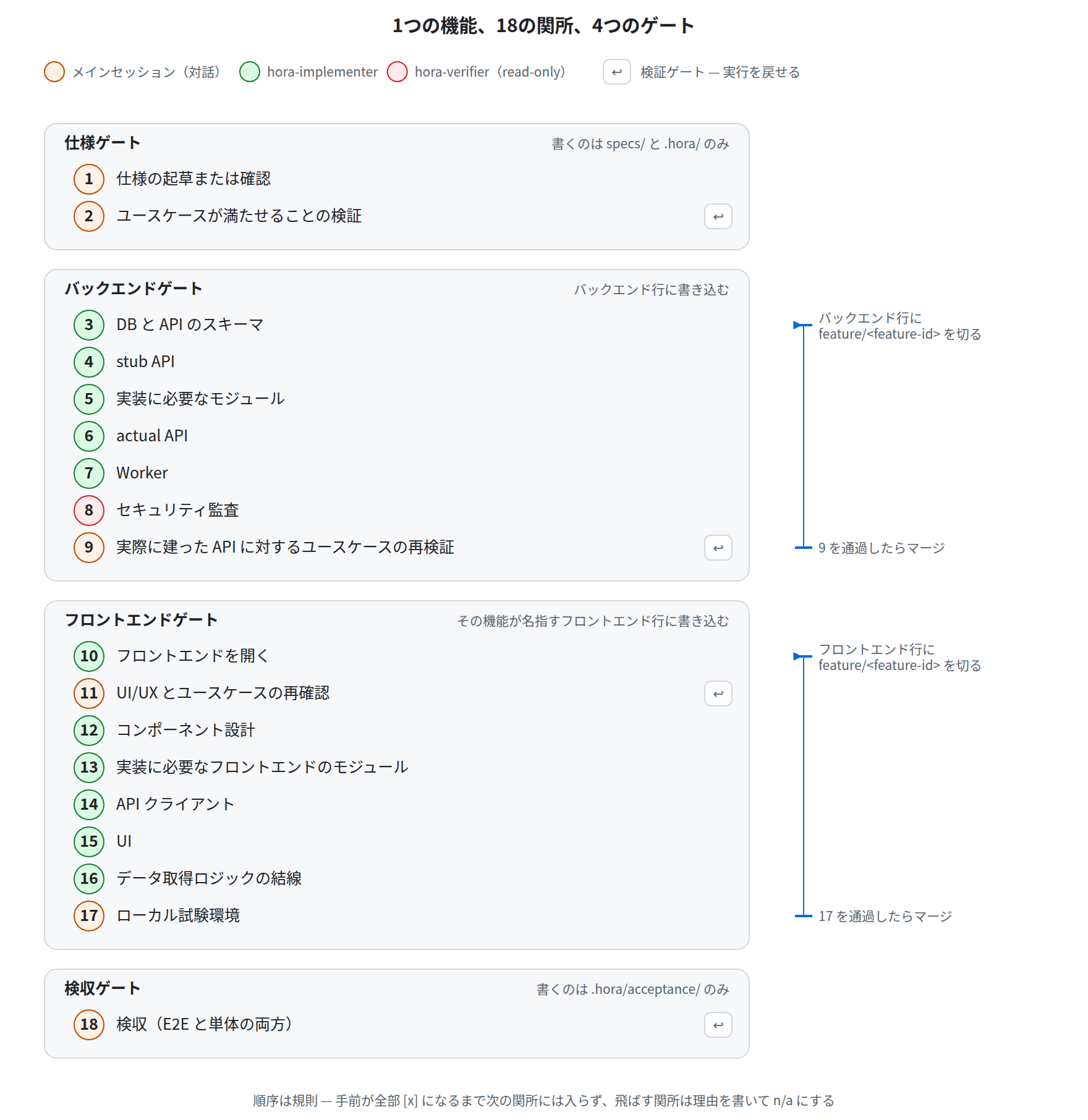
First, the whole thing as a table. The checkpoint headings are quoted in English exactly as they are. /hora-plan copies them verbatim into the feature file, so they are identifiers that must be neither translated nor compressed.
| Gate | # | Checkpoint | What it does |
|---|---|---|---|
| Spec | 1 | Draft or confirm the specification | Confirm the relevant section of the spec |
| 2 | Verify the use cases can be met | Whether the use cases can be met as the spec is written | |
| Backend | 3 | DB and API schemas | Tables and schemas |
| 4 | Stub API | A schema-conformant stub. The frontend can be built against this | |
| 5 | The modules the implementation needs | Line up in advance the modules the next checkpoint imports | |
| 6 | Actual API | Implementation. Resolvers, services, tests | |
| 7 | Worker | Background jobs. If there are none, n/a with a reason | |
| 8 | Security audit | A read-only audit | |
| 9 | Verify the use cases again, against the built API | Walk the use cases against the API that was actually built | |
| Frontend | 10 | Open the frontend | Cut the frontend feature branch |
| 11 | Reconfirm UI/UX and the use cases | Walk the use cases against the screen design | |
| 12 | Component design | Component design | |
| 13 | The frontend modules the implementation needs | Same as 5, on the frontend side | |
| 14 | API client | Build the client against the stub from 4 | |
| 15 | UI | Screens | |
| 16 | Wire the data-fetching logic in | Switch from the stub to the actual API | |
| 17 | Local test environment | The E2E environment. Every service, every role, data for verification | |
| Acceptance | 18 | Acceptance (E2E and unit both) | Delegated to /hora-accept |
At each gate boundary, that line's feature/<id> branch is merged into release/<version> and .hora/ is committed.
3. Only three states
Each checkpoint is recorded as a checkbox in the feature file.
## Backend gate
- [x] 3. DB and API schemas
- [x] 4. Stub API
- [ ] 5. The modules the implementation needs
...
- [x] 7. Worker  <!-- n/a: this feature triggers no background job -->
There are three states: not passed, passed, and n/a with a reason. An n/a without a reason is not recognized as a state. The docs describe this as "a skipped checkpoint merely wearing the mark of a passed one"; in short, "skip it for now" is structurally forbidden.
4. Three deliberate decisions about the order
Behind the ordering of the 18 there are three intentions that the docs state explicitly.
First, the stub (checkpoint 4) comes before the frontend gate. Because of this, 12 through 14 can build the client and screens against "something of the correct shape" without waiting for the implementation in 6. In 16 it is swapped for the actual API, but since the stub and the implementation share class names and interfaces, this is a switch of endpoint rather than a rewrite.
Second, in 5 and 13, the modules the next checkpoint imports are lined up in advance. Before that, 5 checks the catalog of in-house packages (@openreachtech/hora-ecosystem) so as not to reinvent what the company has already published. Discovering midway through an implementation that "we need an external client we do not have" and stopping is a common story, and this checkpoint exists precisely to eliminate that interruption.
Third, the four checkpoints 2, 9, 11, and 18 check against the use cases. This is not "three rehearsals and one real run". They fail in different ways.
| Checkpoint | What it checks is supporting the use cases |
|---|---|
| 2 | Whether the spec supports them |
| 9 | Whether the API supports them |
| 11 | Whether the screens support them |
| 18 | Whether the product supports them |
This is one of the reasons we were able to cut human review substantially. The same use cases are walked four times, against different layers. This misses less than a person eyeballing them once.
5. The four checkpoints that send the run back
The four above are also the only checkpoints that can send the run backward.
| Checkpoint | What it checks against | Where it goes back to when it fails |
|---|---|---|
| 2 | The use cases, as the spec is written | Checkpoint 1 (the spec itself needs to change) |
| 9 | The use cases, against the API actually built | Whichever of 3 through 7 should change. Usually 3 |
| 11 | The use cases, against the screens actually designed | 11 itself, or 2 if the use case was wrong |
| 18 | The product, end to end | The checkpoint that produced the shortfall. Whichever feature it belongs to |
When going back, the marks on the invalidated checkpoints are cleared, and the run returns to the earliest of the cleared ones. The docs say "a run that never goes back means either the spec is abnormally perfect or the verification gates are not doing their job", and going back is treated as normal behavior, not an anomaly.
6. No fixing in passing
About checkpoint 9, the docs carry a caution to the effect of "do not patch on the spot". We touched on this in the main article, but here we write it a little more concretely.
Suppose that while walking the use cases at checkpoint 9, you find that the API response is missing one field. Ordinarily, you would want to add the field right there and move on. It takes a few minutes, and no one seems to be hurt.
Hora Kit does not do that; it goes back to checkpoint 3. The reason is that by that point, work on the frontend side has begun, in a different repository, against the old API contract. If you add the field only on the backend side, the contract and the implementation drift apart bit by bit, and that drift surfaces only later. Going back looks slower, but Hora Kit's view is that it is faster than reconciling a drifted contract afterward.
7. In a non-empty repository, "reconcile" rather than "build"
When the Kit is applied to an existing project, the checkpoints do not run against empty repositories. In that case, each checkpoint "reconciles what should be there with what actually is" rather than "builds". If it is already satisfied, the checkpoint passes; if something is missing, only that much is built.
This property is the foundation for applying the Kit to existing projects (the 9th article in the series).
8. When branches are cut and when they are merged
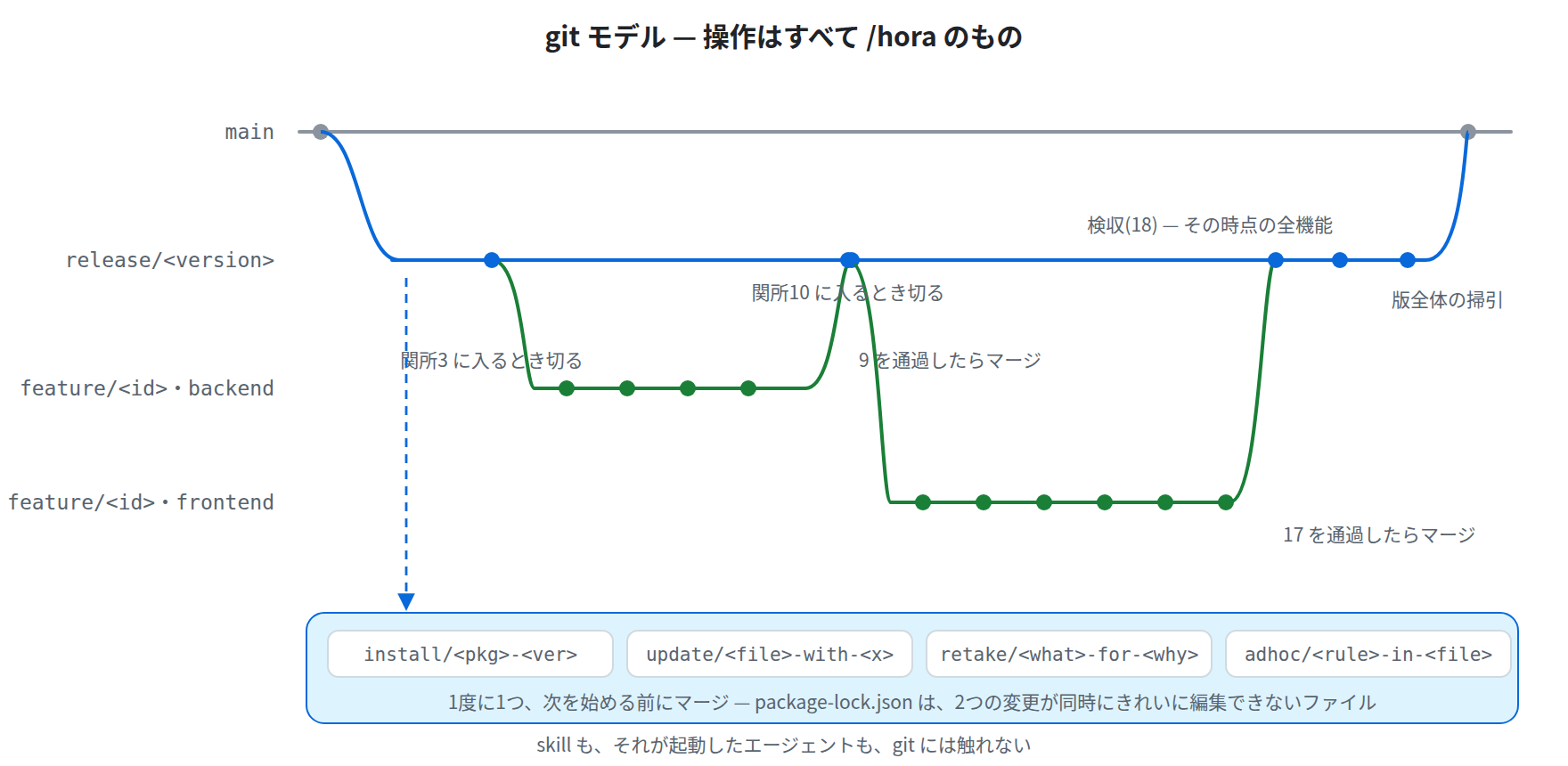
| Line | Cut when | Merged when |
|---|---|---|
backend feature/<id> | Entering checkpoint 3 | Passing checkpoint 9 |
frontend feature/<id> | Entering checkpoint 10 | Passing checkpoint 17 |
Merging happens at the gate boundary, not after acceptance (18). Acceptance runs a suite that covers every feature, so waiting until then would leave the branch open across the work on other features.
Checkpoint 17 alone is an exception. The E2E environment lives on the backend line, and that feature branch was already merged 8 checkpoints earlier (at checkpoint 9). So that change rides on a dedicated update/e2e-<what>-for-<feature-id> branch.
9. Summary
18 looks like a lot, but what it does is four things. Verify the use cases against the spec, build the backend and verify against the API, build the frontend and verify against the screens, and finally accept against the product. The checkpoints are the notches that keep these four verifications from being skipped.
By replacing the verification we used to do by eye with these notches, we were able to cut human review substantially. We hope this is useful to anyone bracing at the number 18.
The original sources are here. https://github.com/openreachtech/hora-core/blob/main/kit/skills/hora-build/references/checkpoints.mdhttps://github.com/openreachtech/hora-core/blob/main/docs/commands.ja.md